
Spot Trading
Binance Fees Explained: Spot, Futures, Convert and Withdrawal Costs
Find the right Binance fee for a Spot or Futures trade, Instant Convert or a crypto withdrawal, then check the final charge against your transaction record.
Binance fees depend on what you do: a Spot or Futures trade, a Convert exchange, and an on-chain withdrawal have different costs. There is no single percentage that describes all four. Before confirming an action, identify the product, check the rate or quoted receive amount that applies to you, and then verify the completed record.
Which cost should you check?
| Action | What can change the amount you pay or receive? | Where to check before confirming |
|---|---|---|
| Spot buy or sell | Maker or taker execution, account tier, fee-payment asset, pair promotion, spread and slippage | The Binance Spot fee schedule, the pair's order screen and promotion terms |
| Futures order | Commission on each fill, plus any funding payment while a perpetual position is held; liquidation can add a separate charge | The Futures fee page, contract rules and displayed funding rate |
| Instant Convert | The amount of the asset in the live quote; its rate can differ from Spot | The receive amount in the Convert preview before accepting it |
| Crypto withdrawal | Coin, network, current withdrawal fee and minimum; the receiving platform may have its own rules | The final withdrawal screen for the selected coin and network |
The table is a route to the applicable information, not a promise that a quoted rate will stay the same. Availability and terms can differ by account, pair and location.
Spot trading: a fee on each completed fill
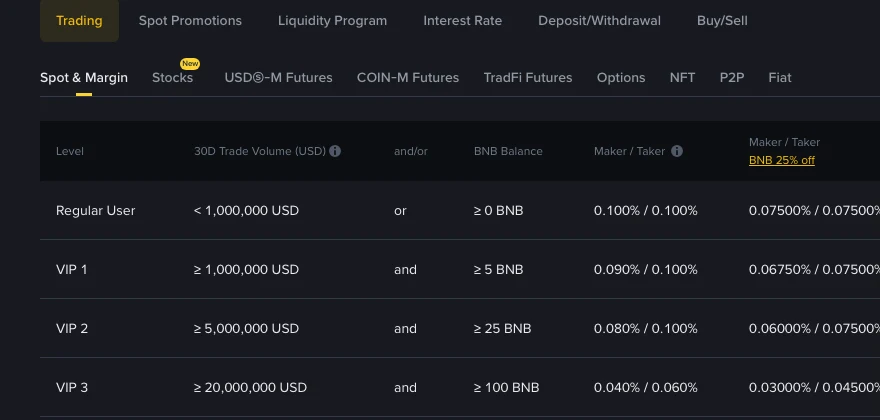
On 5 October 2026, Binance's public Spot & Margin table showed 0.100% maker and 0.100% taker in the standard Regular User column. It showed 0.07500% in the separate BNB-payment column. Those figures are a dated reference for that row, not your universal rate: the table also has different VIP and USDC columns, and pair promotions can apply. Read the row and column for your account and pair on the live fee page.
Binance's public fee table, captured on 28 September 2026. The standard Regular User rates shown here were checked again on 5 October 2026; use the live table for a current rate.
A simple estimate is executed trade value × applicable fee rate. At an assumed 0.100% rate, a 1,000 USDT trade has a 1 USDT fee equivalent. That does not mean Binance always deducts 1 USDT. Its Spot fee guide says the fee is normally taken from the asset received: buying ETH with USDT can produce an ETH fee, while selling ETH for USDT can produce a USDT fee. Eligible BNB fee payment changes the deduction asset. For a buy followed by a sale, calculate both fills separately; the Spot buy-and-sell fee example walks through the balance calculation.
Futures: commission and funding are separate
For USDⓈ-M Futures, Binance calculates execution commission from filled notional value × fee rate, according to its Futures fees FAQ. The margin you post is not the commission base. Check the contract type, your maker or taker role and the current fee page before estimating both an opening and a closing fill. A limit order that immediately matches can be a taker.
A perpetual position may also pay or receive funding at settlement. Binance describes that as a transfer between long and short holders, rather than another execution commission. The rate and settlement interval can vary by contract. Forced liquidation may involve an insurance clearance fee as well. Keep these entries separate when adding up a trade's cost; the Futures commission and funding guide shows the calculation for each.
Convert: compare the amount received, not the fee label
Binance says an Instant Convert quote has no additional fee beyond its quoted price, while that price may differ from the Spot market. A “zero fee” label therefore cannot tell you which route gives more of the asset you want. Its Convert FAQ says the preview shows the amount you will receive if you accept the current quote.
To compare routes, enter the same input asset and amount in Convert and estimate the net amount after a Spot fill and its fee. Refresh both figures if the quote expires or the market moves. A Spot order can slip or fill partly, so an estimate is not a guaranteed result. Other Convert modes have different execution rules; this comparison concerns Instant Convert.
Withdrawals: select the exact network first
A crypto withdrawal is a separate event from buying or selling. Binance's withdrawal-fee FAQ says the fee can change with network conditions and that a minimum withdrawal amount applies. Check the coin and the network supported by the recipient before comparing displayed charges. A cheaper network is not useful if the destination cannot receive it. The network-by-network withdrawal checklist explains the remaining address, memo and minimum checks.
Check what you actually paid
Before acting, note the product, pair or coin, network if relevant, account tier, fee-payment setting and the displayed rate or receive amount. After a Spot or Futures fill, inspect the trade record for executed quantity, fee amount and fee asset; partial fills may create more than one fee entry. Review funding transfers separately from Futures commissions. For Convert, compare the accepted quote with Convert History. For a withdrawal, compare the confirmed amount and fee with the withdrawal record.
This guide describes fee categories and a way to verify them; it is not a live quote or a recommendation to trade. The official pages linked above and your own confirmation and transaction records determine the amount that applies to you.