
Getting Started
How to Save a Binance Withdrawal Address and Use the Whitelist Safely
Save a Binance withdrawal address, understand how the whitelist changes where you can send, and verify the network and Memo before a first transfer.
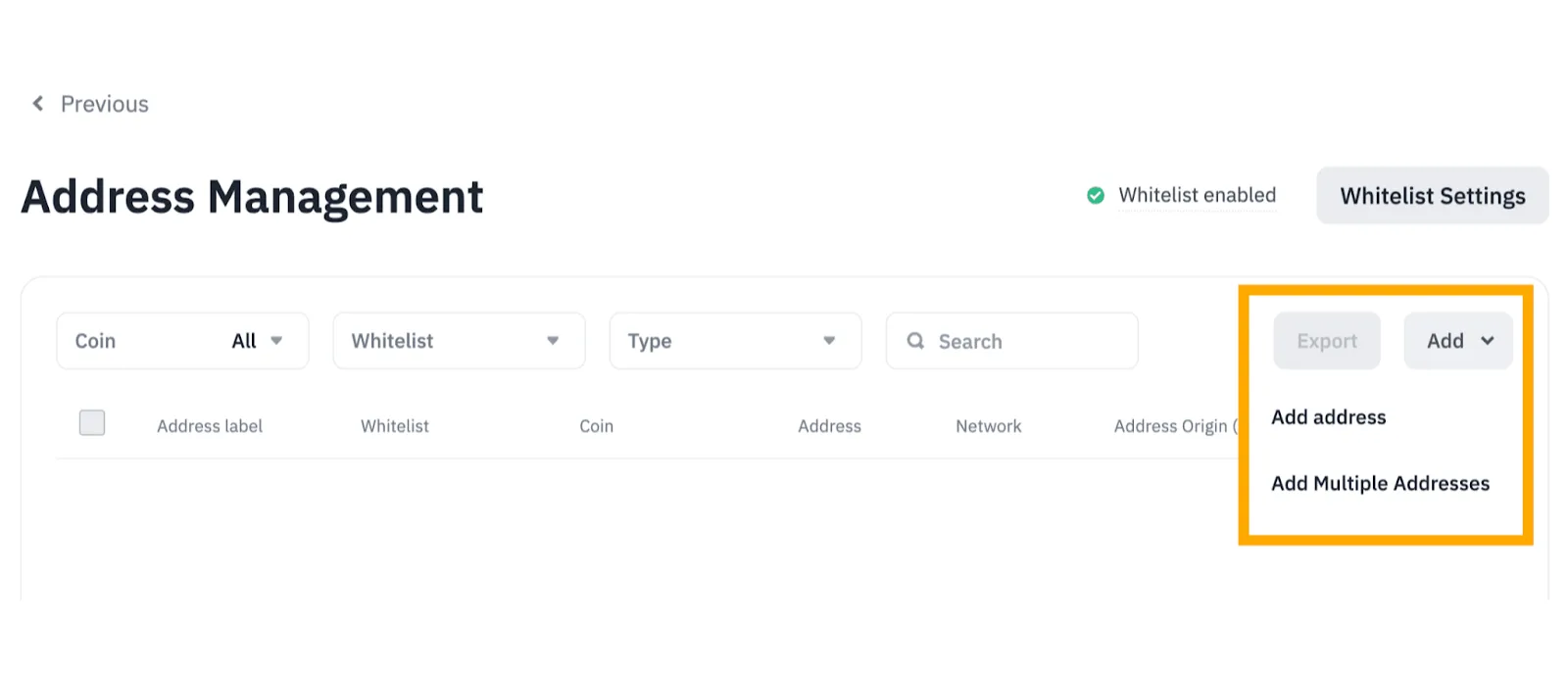
Saving a Binance withdrawal address makes a destination easier to reuse. It does not, by itself, make that destination safe or restrict where your account can send funds. Before adding one, get the receiving platform's current deposit details; then decide whether you also want Binance's withdrawal whitelist to limit transfers to approved addresses.
Address book, whitelist and waiting limit: what changes?
| Setting | What it does | What it does not do |
|---|---|---|
| Saved address | Stores a destination and a label for later selection | Verify that the recipient supports your coin and network |
| Withdrawal whitelist | When enabled for the account, restricts withdrawals to addresses on the whitelist | Correct a wrong address, network or missing Memo |
| Whitelist Withdrawal Limit | If you enable it, delays use of newly added whitelisted addresses for the period you select | Apply an automatic waiting period to every account |
Binance describes these as separate controls in its withdrawal settings guide. A saved entry and a whitelisted entry can appear in the same address manager, but the account-wide whitelist switch determines whether the restriction is enforced. Check the live setting before relying on it.
Get the receiving details first
Open the destination wallet or exchange yourself and find its deposit instructions for the exact asset. Copy the complete address from that screen. Record the network it accepts and any required Memo, Tag or Payment ID. Do not infer the network from the coin name or the appearance of an address. Some address formats are shared across networks, and a familiar-looking address is not proof that the destination supports your choice.
Binance's withdrawal instructions warn that a network mismatch can make funds unrecoverable. They also note that some destinations require a Memo. If the destination gives several supported networks, compare only those options; our Binance withdrawal fee and network guide explains where to read the current fee and minimum. If you cannot confirm the receiving network or Memo requirement, stop before saving or sending.
How do you add the address on Binance's website?
Binance's public help page shows this website path. Menus can differ by region or app version, so follow the labels visible in your own account:
- Open Settings → Withdrawal → Address Management. Choose Add address.
- Give the entry a label that identifies the destination to you. Select the coin and the network supported by the receiver.
- Paste the receiver's full address. Set Address Origin if useful; Binance labels that field optional. Add the Memo or Tag if the receiver requires one and your form provides that field.
- If this destination should be on your whitelist, select Add Address to Whitelist. Review every field, save, and complete the passkey or two-factor check Binance requests.
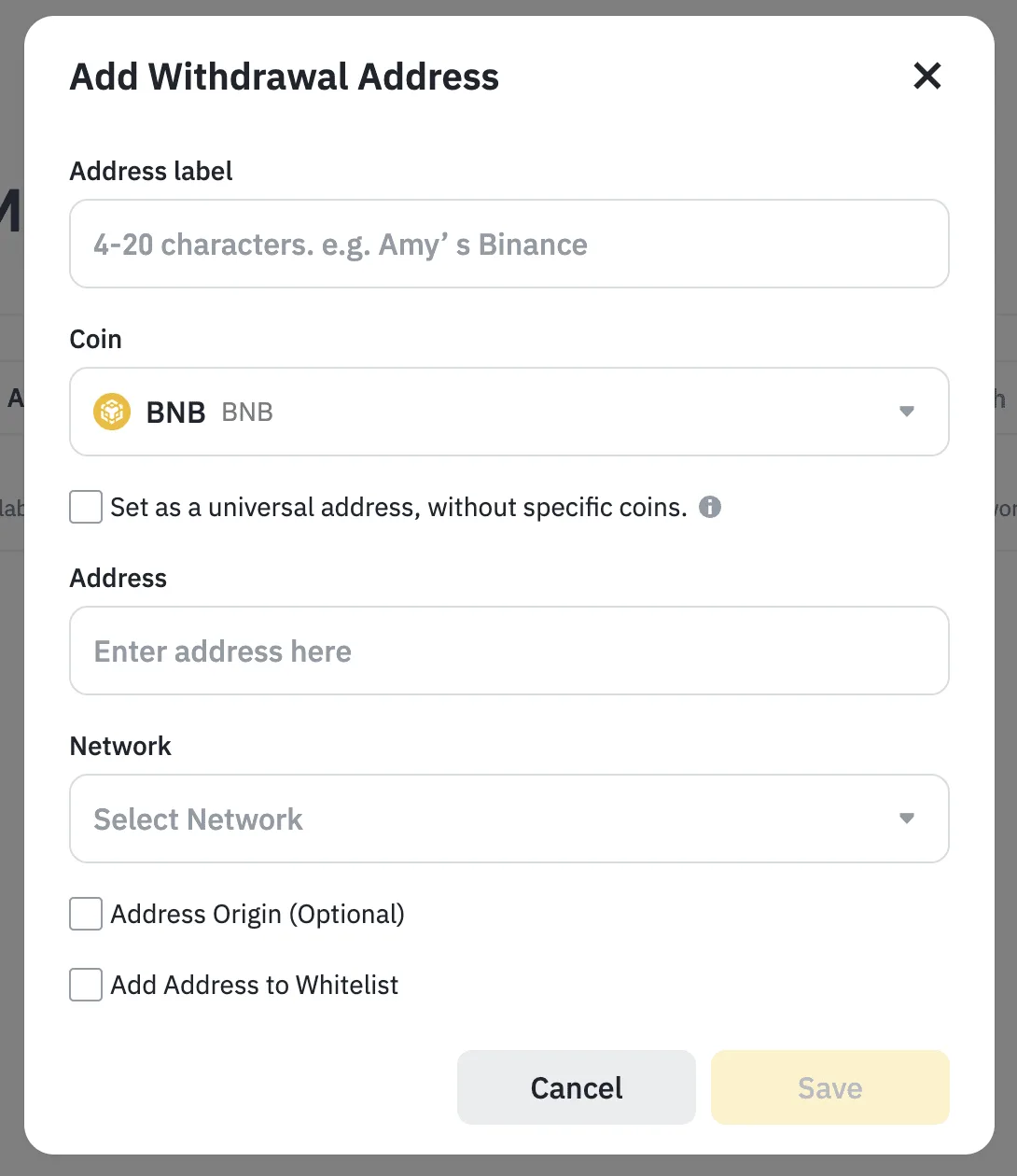
Binance's help-center screenshot shows the address form as documented in March 2025. It contains example fields, not a live account or a current withdrawal quote.
Binance also offers a universal address option that is not tied to one coin. “Universal” does not mean every network or token is compatible: Binance describes reuse only for coins that run on the saved address's network. Unless you have checked that compatibility at the receiving end, a coin-specific entry is easier to verify.
When should you turn on the whitelist?
If you repeatedly withdraw to a small set of destinations, the account-wide whitelist can block withdrawals to other addresses. First review the entries you intend to keep, then enable Withdrawal Whitelist under withdrawal settings and complete Binance's security verification. Merely checking “Add Address to Whitelist” while saving an entry is not the same as confirming that the account-wide restriction is on.
If you enable Whitelist Withdrawal Limit, Binance says newly added whitelisted addresses wait for the period you select before they can receive a withdrawal. Binance also warns that changing whitelist settings may temporarily suspend withdrawals. There is no single waiting period to assume for every account: read the actual time and prompts shown when you make the change. Do not turn off a safety setting just to rush an unverified transfer.
Check the saved entry before sending
Reopen the recipient's deposit screen and compare the entire destination address, coin, network and any Memo with the saved entry and Binance's final confirmation. A label is only a reminder; it is not a verification of ownership. Read the current fee, minimum and final received amount. For a new destination, Binance suggests a small first transfer to test the details, provided it meets the displayed minimum. Confirm that test arrived before sending the remainder. Our step-by-step Binance withdrawal guide covers the full transfer flow.
If a saved address appears but Binance blocks the request, check whether the account-wide whitelist is on, whether that particular entry is whitelisted, whether a waiting limit applies, and what the on-screen message actually says. If a transfer was already submitted, use its record and transaction ID to locate where a Binance transfer is delayed before sending again.
Sources checked 15 October 2026: Binance's withdrawal-settings help page (last updated March 2025) and withdrawal instructions (updated September 2026). Account controls and screens can vary by region and may change; use your own current Binance and receiving-platform screens for the final decision.