
Getting Started
Binance Deposit and Withdrawal Status: Finding Where a Transfer Is Stuck
A transfer stops in one of three places: the platform, the network, or the receiving side. The transaction hash tells you which, and that decides what to do.
When a transfer has not arrived, the useful question is not "how long does it take" but which stage it stopped at. There are only three: the platform that sent it, the blockchain carrying it, or the platform receiving it. Each has a different fix, and the transaction hash tells you which one you are in.
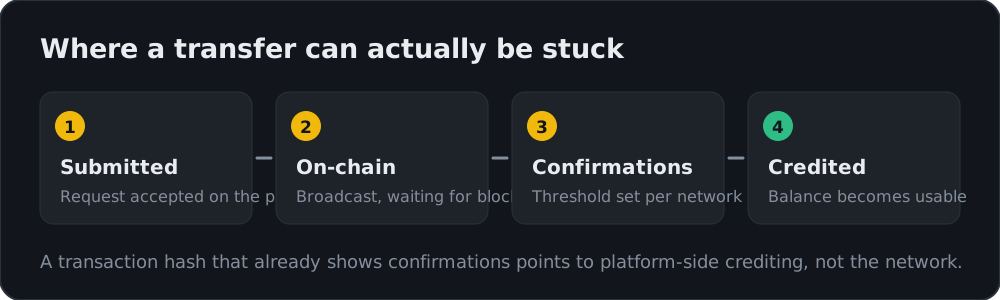
The four stages
- Submitted. The request is accepted and under platform review. Nothing exists on-chain yet.
- On-chain. The transaction is broadcast and has a transaction hash, usually shown as TxID.
- Confirmations. Blocks are accumulating. Every network has its own required confirmation count before a receiver treats the funds as final.
- Credited. The receiving platform has attributed the deposit and the balance is usable.
Find the record first
For withdrawals, open Transaction History → Withdrawal. For deposits, open Transaction History → Deposit. Each entry shows the status, the network, the amount and — once broadcast — the TxID.
The TxID is the piece that matters. It converts a vague "my money is missing" into a checkable fact.
Reading what the TxID tells you
Paste the TxID into a block explorer for that network:
| What the explorer shows | Where the transfer is | What to do |
|---|---|---|
| No such transaction | Still platform-side, not broadcast | Wait for review; check for security holds or pending confirmations |
| Present, 0 confirmations | Broadcast, waiting for a block | Wait — this is normal network behaviour |
| Confirmations below the required count | On the network | Wait; the requirement is set by the receiver |
| Confirmations complete, receiver has not credited | Receiving-platform side | Contact the receiving platform with the TxID |
| Confirmed but address is not yours | Sent incorrectly | See the wrong-network and memo cases below |
That last-but-one row is the important one. If the chain shows the transfer confirmed, the network has done its job. Continuing to wait accomplishes nothing; the question belongs to whoever is receiving.
Why withdrawals sit before broadcast
A withdrawal held at the first stage is usually not a network problem:
- routine risk review, especially on a new address or an unusual amount;
- a security cooldown after changing a password, email, phone or 2FA method;
- the withdrawal whitelist setting being enabled;
- verification requirements not yet met for that product or limit tier.
These clear on the platform's own timetable. Binance withdrawal pending covers the specific holds and how long each typically runs.
Why deposits stall after confirmation
- Memo or tag omitted on a network that requires one — the funds arrived but cannot be attributed to your account.
- Wrong network used for a token that exists on several chains.
- Unsupported token sent to an address that only handles certain assets.
- Deposit address reused after the platform rotated it.
Each of these needs support with the TxID, and outcomes vary. Binance deposit not credited walks through the recovery paths.
What to gather before opening a ticket
Having this ready turns a multi-day exchange into one message:
- the TxID and the network used;
- the exact coin and amount;
- the sending and receiving addresses;
- the memo or tag, if the network uses one;
- a screenshot of the explorer showing confirmations.
Do not do this
Scam accounts monitor public complaints about stuck transfers and respond as "support."
- Real support is reached only from inside the signed-in official site or app.
- Nobody legitimate asks for your password, 2FA codes, seed phrase or remote screen access.
- Nobody legitimate asks for an upfront payment to "release" or "unlock" a transfer. That request is always a scam.
- Do not post your TxID alongside personal details on public forums.
Related reading
- Picking the network before you send: Binance withdrawal fees and networks
- The full withdrawal process: how to withdraw from Binance
- Funding an account: Binance deposit guide
- Moving balances internally: Binance wallet transfers
⚠️ Confirmation requirements and review times vary by network, asset and region. Not investment advice.