
Futures
Binance Reduce Only: Close a Futures Position Without Reversing
Reduce Only lets a futures exit shrink an existing position without opening the opposite side. Learn when to use it, why Binance may reject the order, and what to check before closing.
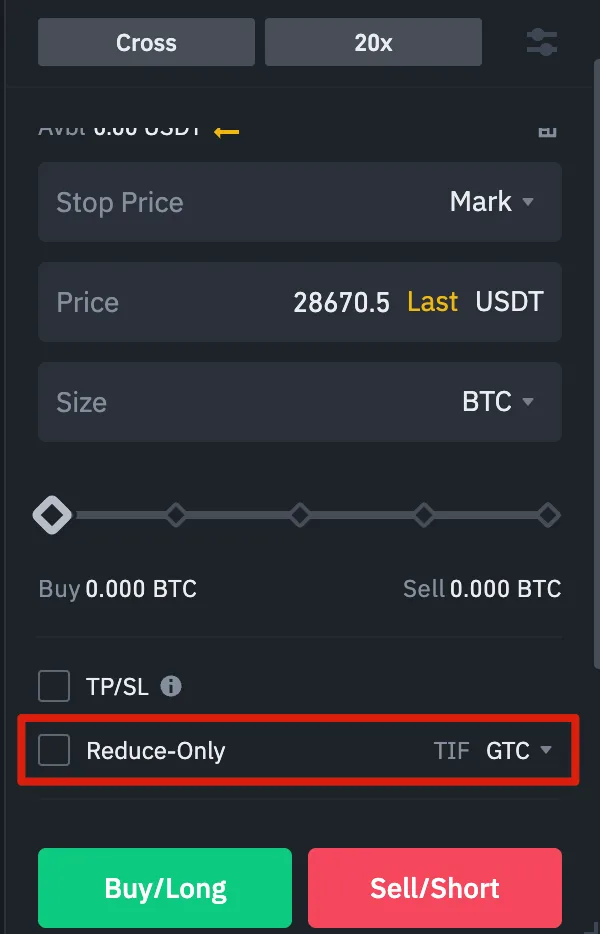
Binance Reduce Only tells a futures order to decrease an existing position, never increase it or open the opposite side. If you hold a long position and submit a sell that is larger than the position, this instruction is meant to prevent the extra quantity from becoming a short. It is useful when a stop, take-profit and manual exit might overlap. It does not guarantee that the exit will be accepted or filled.
Binance's own screenshot of its Futures order-entry panel, published in its Futures guide. The interface may have changed; use this image to identify the control, then check the controls shown in your current account.
What changes when you select Reduce Only?
In One-way Mode, a contract has one net position. A sell reduces a long; a buy reduces a short. Binance's Futures guide says a Reduce-Only order can only decrease the open position.
| Current position | Order that reduces it | What Reduce Only prevents |
|---|---|---|
| Long 0.5 BTC | Sell | The sell continuing past zero into a short |
| Short 0.5 BTC | Buy | The buy continuing past zero into a long |
These quantities illustrate the rule; they are not a trade recommendation. Without the instruction, a fully executed 0.8 BTC sell against a 0.5 BTC long would close 0.5 BTC and leave a 0.3 BTC short in One-way Mode. With Reduce Only, the order cannot create that short. Do not assume an oversized order will be accepted for the smaller amount: Binance may reject it after its order and margin checks.
When is it useful?
The safeguard matters when more than one exit could act on the same position. For example, suppose you have a take-profit order and later try to close manually. The position size can change before either order executes. An automated exit has the same problem if it uses a position size read earlier. Reduce Only stops an exit from increasing exposure after the live position shrinks, but an old order can still be canceled or rejected. After any partial fill or manual close, check remaining position size and open exits rather than assuming they have adjusted themselves.
To place a manual exit, first check the contract, current position and position mode. Choose sell for a long or buy for a short, enter a quantity no larger than you intend to close, and enable Reduce-Only where the current Binance interface offers it. Review the order before submission, then confirm both its order status and the resulting position. This is a check sequence, not a claim that every Binance interface uses the older panel pictured above.
Why can a Reduce-Only order fail or disappear?
Binance's failed-orders FAQ lists several causes: the order points in the same direction as the open position; an oversized closing order fails a margin check; or competing Reduce-Only limit orders have higher priority and an older order is canceled. Its example shows that a more aggressive new limit exit can displace an existing exit when their combined quantities exceed the remaining position. A closed position or a changed quantity can also leave no position for a later conditional exit to reduce.
If Binance rejects an exit, inspect the current position, the open orders for that contract, the reducing side, and the quantity. The FAQ advises canceling conflicting open orders before trying again when Binance reports a Reduce-Only conflict. Recheck the position after cancellation: do not blindly resubmit the old quantity. A market or stop-market exit has different execution behavior from a limit exit; Reduce Only itself does not set a trigger price or eliminate slippage. For the fill trade-off, see our stop-limit versus stop-market guide.
Does it work the same way in Hedge Mode?
No. Binance's Hedge Mode FAQ explains that Hedge Mode can hold a long and short in the same contract, whereas One-way Mode nets them. Binance's USDⓈ-M API order documentation says the reduceOnly parameter cannot be sent in Hedge Mode; that mode requires an explicit position side. The exact controls can differ between web, app and API. If you cannot find the checkbox, check your position mode and the closing controls in the interface you are using. Our One-way versus Hedge Mode explanation covers why the same buy or sell instruction can have a different effect.
Finally, Reduce Only is an order constraint, not a substitute for monitoring margin or the position itself. If a closing order remains unfilled, the position remains exposed. Read how Binance's liquidation price is determined before relying on an unfilled limit exit as protection.
Sources checked 29 September 2026. Binance can change its interface and order rules; verify the live position, order status and official help before acting. This article explains mechanics and is not investment advice.